

Your profile holds your photo and contact details, and the email address on it is where CrewdUp sends your emails. Every role has a profile, and you can only edit your own.
Short version
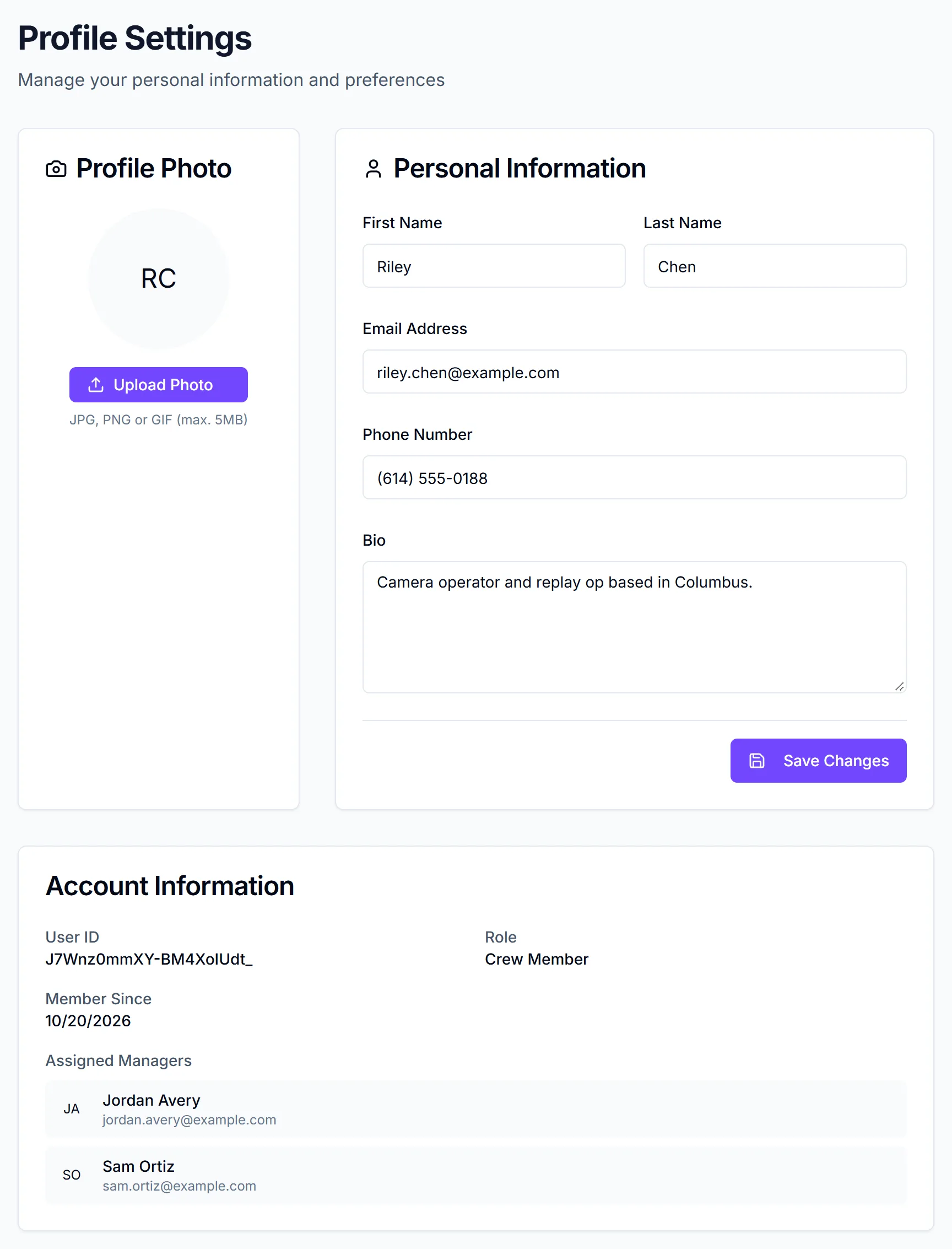
Open your user menu and click Profile. Click Upload Photo to add a photo (it saves straight away), edit your details under Personal Information, then click Save Changes.
Open your profile
- Everyone: open the user menu in the header, then click Profile.
- Crew and talent: you can also click My Profile in Quick Actions on your dashboard.
The page is titled Profile Settings.
Add or change your photo
- In the Profile Photo card, click Upload Photo.
- Choose a JPG, PNG or GIF up to 5 MB. WebP works too.
The photo saves as soon as you choose it. You'll see "Your profile photo has been updated." There's no Save step for the photo.
If the file is over 5 MB, you'll see "File too large" and nothing changes.
Edit your details
- In the Personal Information card, edit any of these fields:
| Field | Required | |---|---| | First Name | Yes | | Last Name | Yes | | Email Address | Yes, a valid email | | Phone Number | No | | Bio | No |
- Click Save Changes. The button reads "Saving..." while it works.
You'll see "Profile updated" when it's done.
Check your role and managers
The Account Information card at the bottom is read only. It shows your User ID, your Role and Member Since.
Crew also see Assigned Manager(s), with each manager's name and email. These are the managers whose events you can see on your dashboard. If it's empty, ask your team's manager to link you. Talent don't see this section. See roles explained for what each role can do.
Changing your email address
Changing Email Address updates where CrewdUp sends your emails. It does not change the email you sign in with. Keep signing in with your original email and password, or with Google if that's how you signed up.
If the new address is already used by another account, the save fails with an error.
Things to know
- No password change here. To change your password, sign out and use Forgot your password? on the sign-in page. See reset your password.
- No availability or email settings. The web profile has no availability calendar and no setting to turn emails off.
- There's no control to delete your own account.
- Your phone number is visible to your team. Managers, and crew linked to the same manager, can see it in the Crew Members directory.